BLOG/
Booker Blitz Datastudio Guide: Theme Editor, Bulk Operations & TEW Import
Datastudio is the free database editor that ships with Booker Blitz. It is where you build a custom wrestling universe, convert a TEW database into Booker Blitz format, clean up a messy roster in one click, and design a promotion theme the game can load.
The last few releases added two big tools: a Theme Editor with community themes, and Bulk Operations, which change the whole datapack at once and show you every change before anything is written. This guide covers both, then walks through building a database and a theme from scratch or from an existing .db / .mdb file.
What Datastudio does
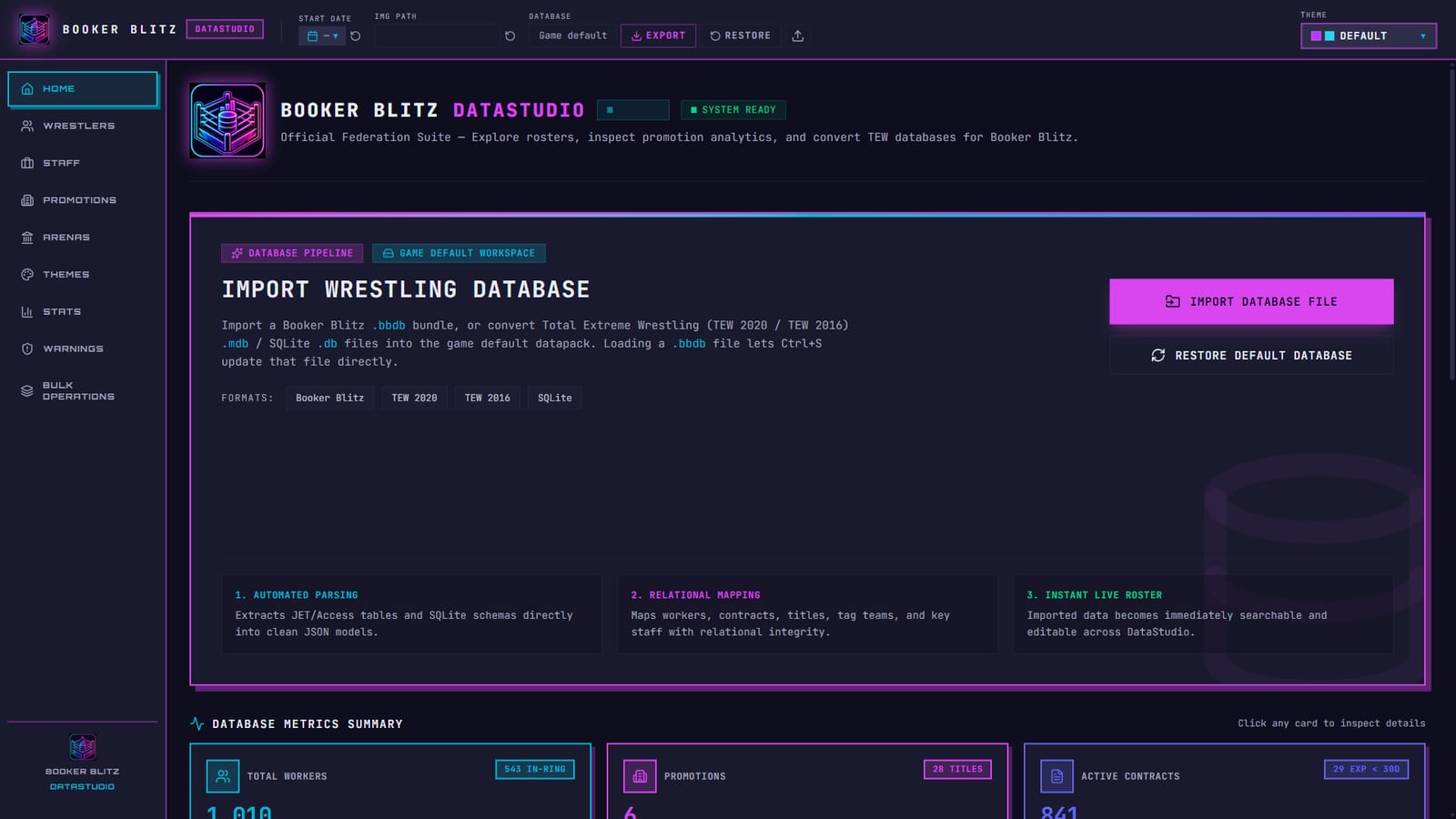
Datastudio is a desktop app that sits next to the game. It opens the datapack the game uses (wrestlers, staff, promotions, indies, titles, teams, arenas) and gives you a full editor for each part:
- Home: a health report for the loaded database. Total workers, promotions, contracts, average wrestling ability, championships and an integrity score, plus the import panel.
- Wrestlers and Staff: list and gallery views with filters for promotion, gender, style, gimmick, base, birthplace and photo status.
- Promotions: identity, house shows, key staff, shows and titles, teams, alliance and facilities. Indie feds live in the same screen.
- Arenas: venue lists saved as
.bbarenaspacks. - Themes: the Theme Editor.
- Warnings: every broken reference, with a Fix button.
- Bulk Operations: datapack-wide edits with a preview.
Your work saves to a .bbdb file with Ctrl+S. The first time you edit the default world, Datastudio asks where to keep that file so your changes never touch the game's own files.
Wrestler and promotion editing
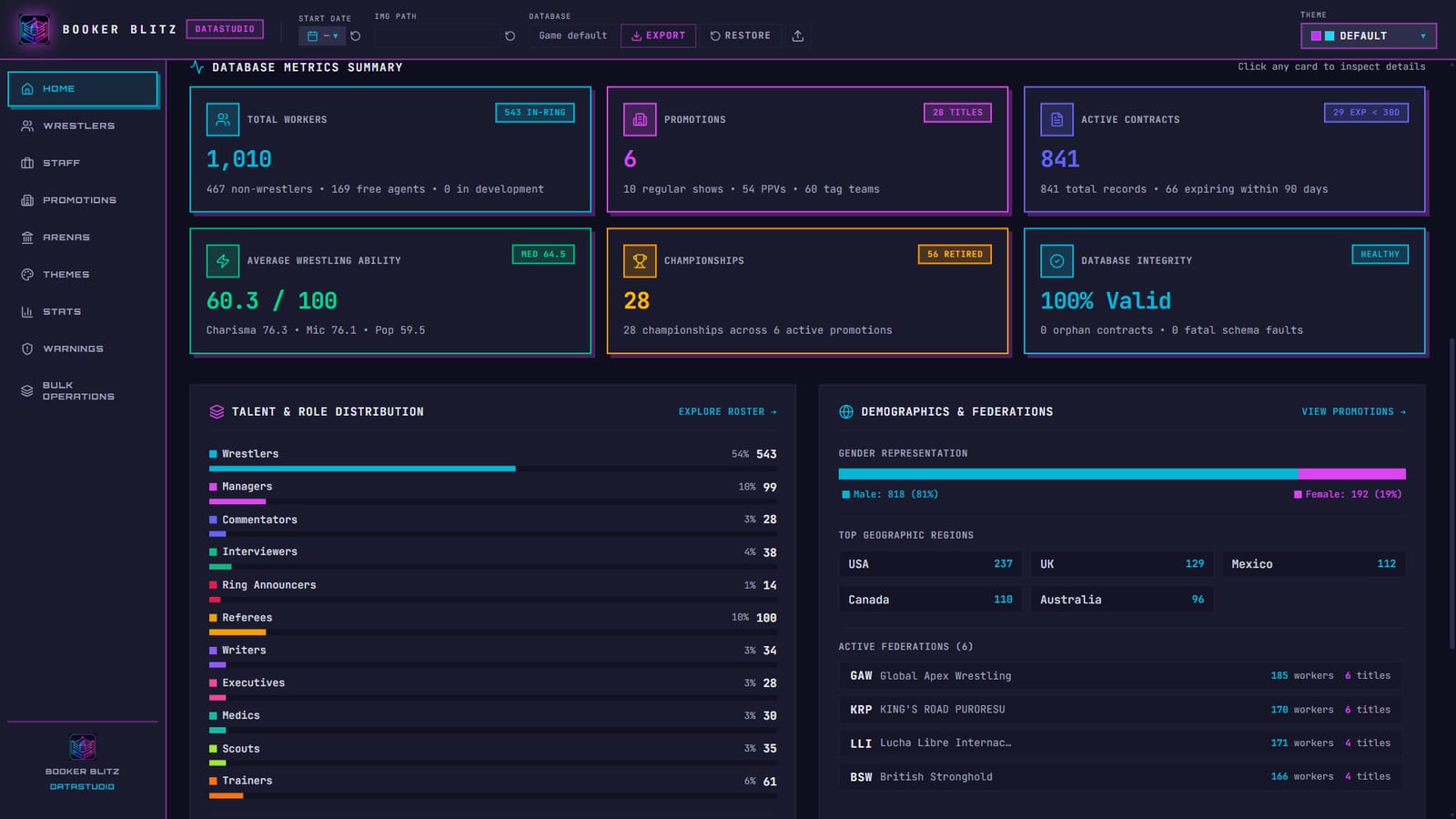
Every worker has an identity block (name, real name, nickname, gimmick, picture), a physical block (gender, base, height, weight, birthplace, dates) and a stats block. Press F on the wrestler list to open gallery mode: a full-size portrait with card position, gimmick, promotion, weight class, current and potential ability, and the four core stats beside it. Arrow keys step through the roster, so you can review 500 workers without touching the mouse.
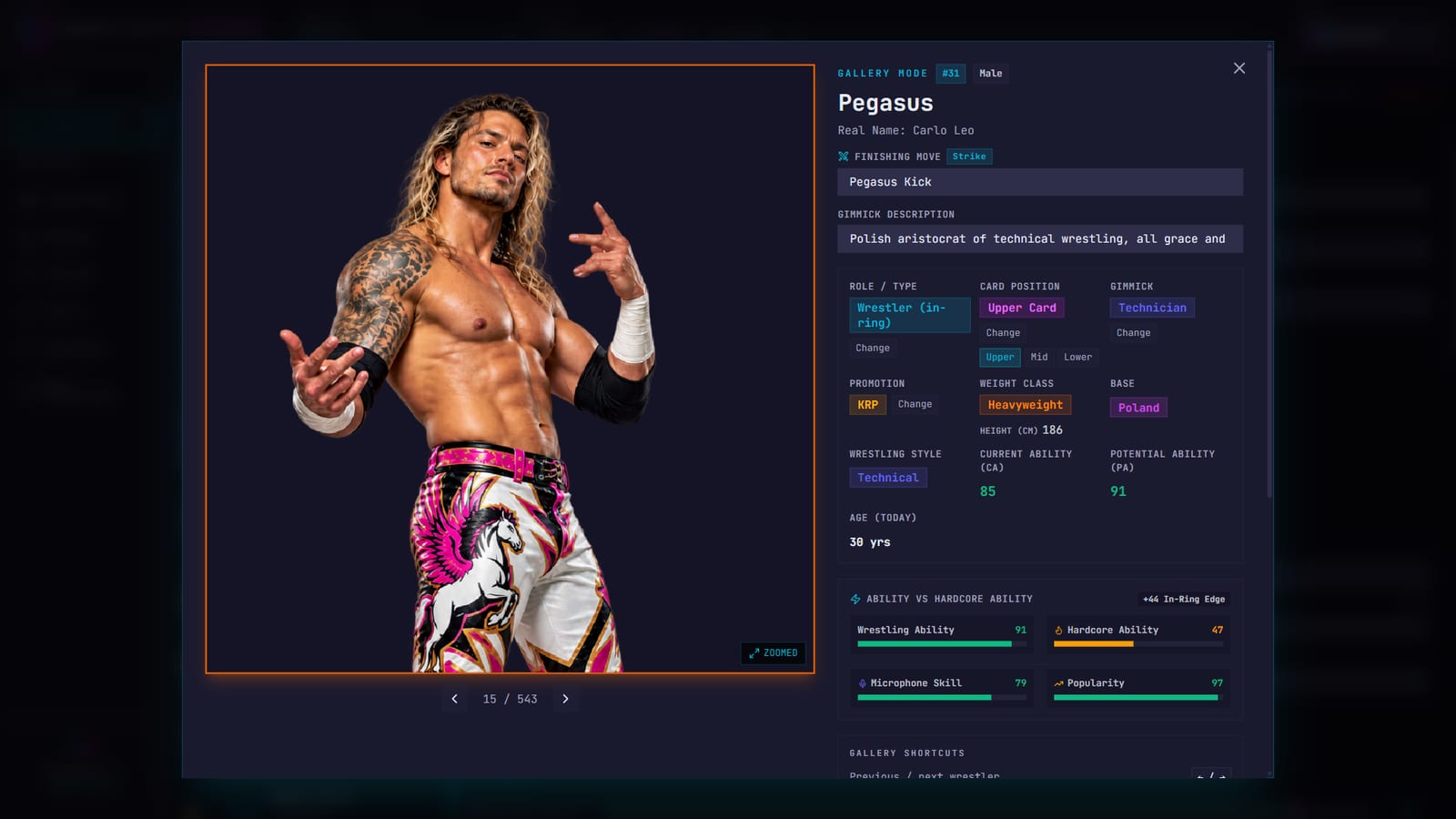
Promotions get the same treatment. The Overview tab holds the name, logo, base, level, balance, audience size and momentum. The other tabs cover house shows, key staff per show and PPV, titles (including development titles), teams and stables, alliances and facilities.
The Theme Editor
A Booker Blitz theme changes how the whole game looks: interface colours, the stat colour scale, and the background art on the title screen, new game setup, live events and contract talks. The Theme Editor builds one with a live preview.
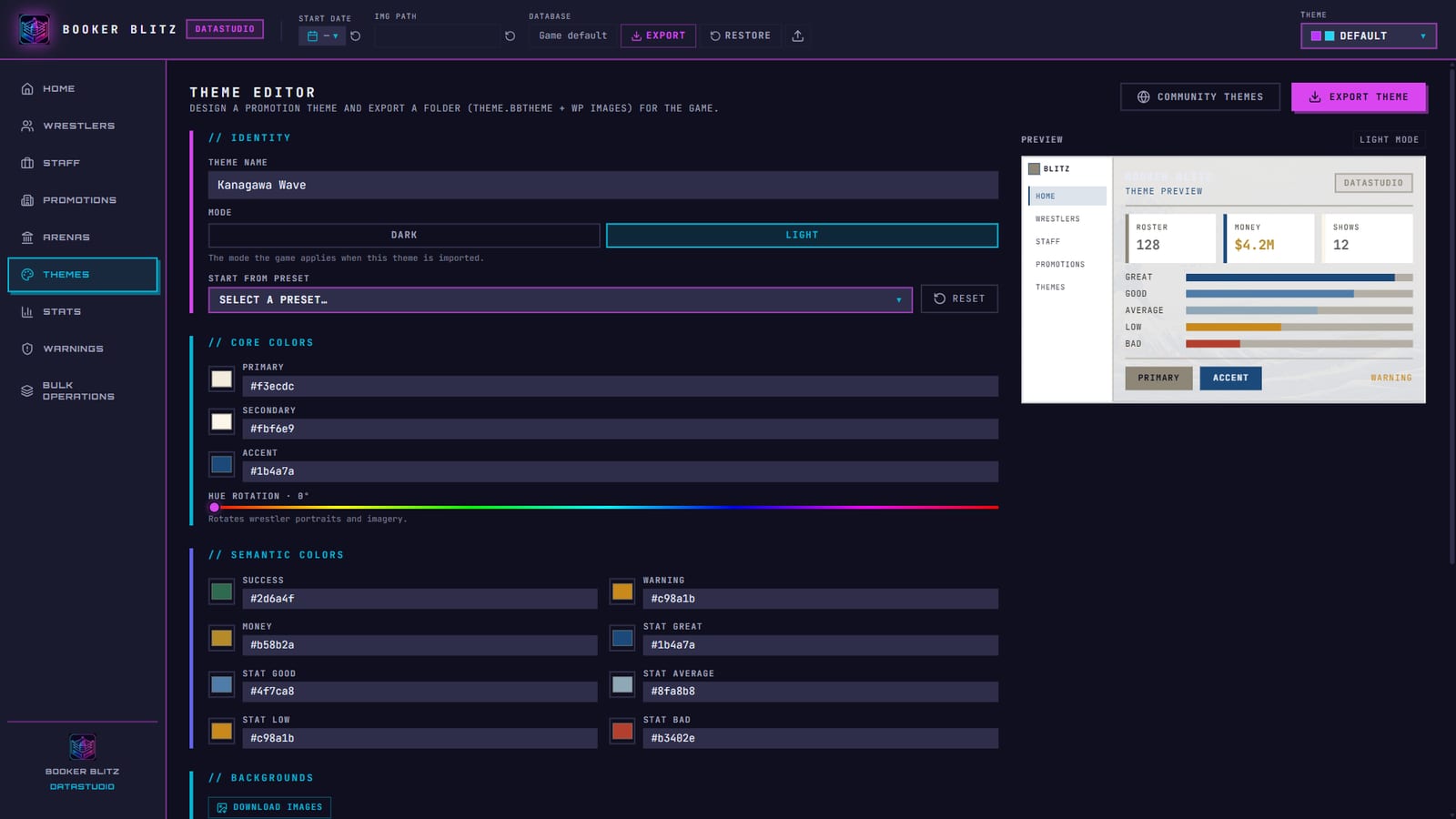
What you can change
| Section | Fields | What it affects in the game |
|---|---|---|
| Identity | Theme name, mode (dark or light) | The name shown in Settings and the mode the game switches to on import |
| Core colours | Primary, secondary, accent | Buttons, highlights, borders, navigation |
| Hue rotation | 0 to 360 degrees | Tints wrestler portraits and imagery to match the palette |
| Semantic colours | Success, warning, money | Confirmations, alerts, every dollar figure |
| Stat scale | Great, good, average, low, bad | The five-step colour scale on every rating bar |
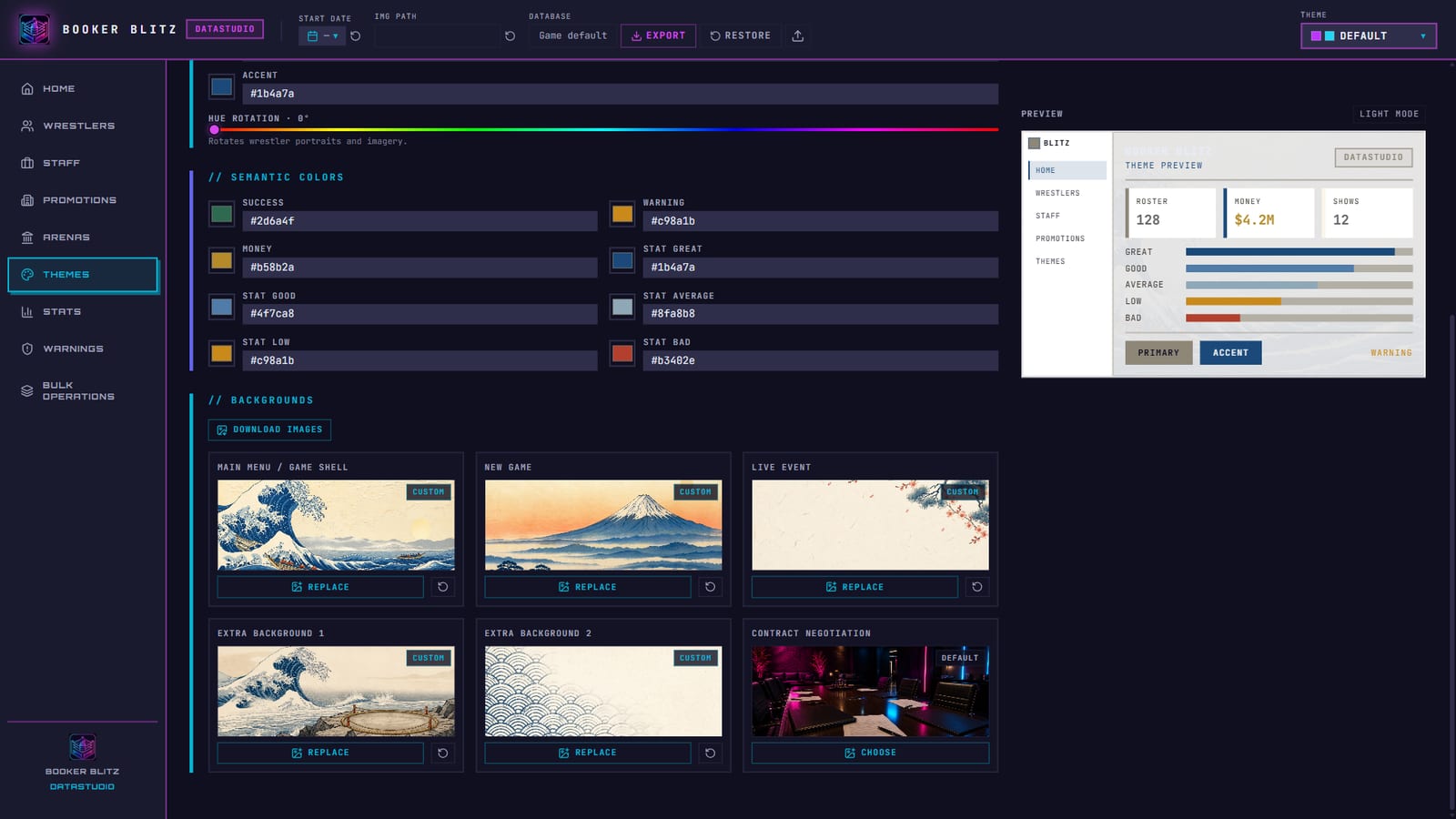
| Backgrounds | Six image slots | Main menu and game shell, new game, live event, two extra slots, contract negotiation |
Start from preset loads one of the built-in promotion themes as a base. Reset puts the default colours and backgrounds back.
Background slots
Each background slot shows the bundled art marked Default until you pick your own image, then it switches to Custom. The small reset arrow on a slot clears that one image without touching the others.
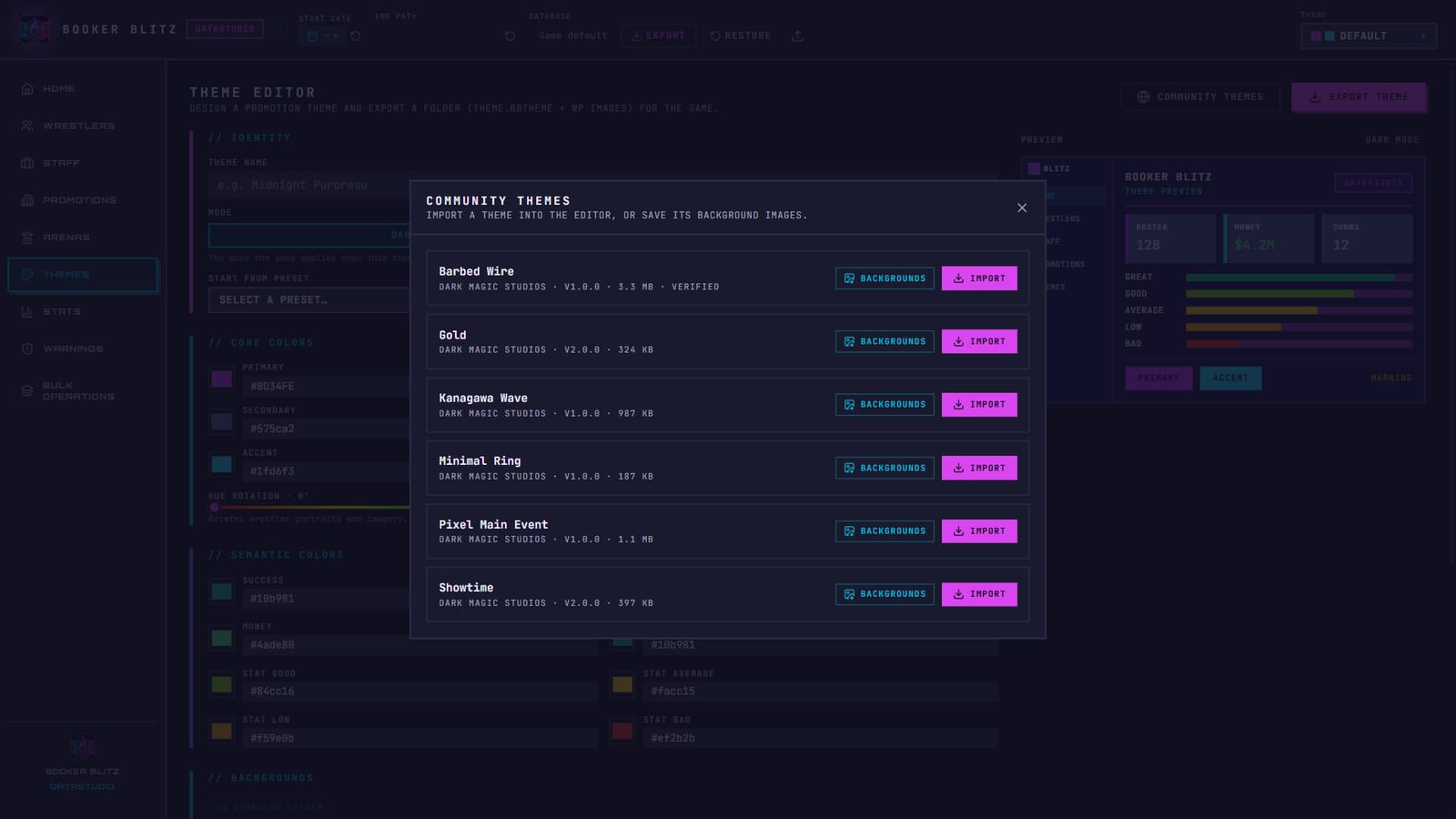
Community themes
The Community Themes button opens a catalogue of themes published by the community. Each entry shows its author, version, size and a Verified badge when it has been checked. You get two actions:
- Import loads the theme's colours and backgrounds into the editor, so you can play with it or use it as the base for your own.
- Backgrounds saves just the background images to a folder.
Downloads are checked against the published checksum before Datastudio uses them.
Exporting a .bbtheme
Give the theme a name and press Export Theme. Datastudio writes a folder containing theme.bbtheme (the colours) and a wp/ folder with any custom backgrounds. Keep the folder together when you share it.
Bulk Operations
A real-world database has hundreds of workers. Fixing card positions or picture names one record at a time takes an evening. Bulk Operations runs one change across the whole datapack.
Every operation works the same way:
- Set its options (a level, a threshold, a name style).
- Press Preview. Datastudio lists every record that would change and why. Nothing is written yet.
- Press Apply if the list looks right.
- Changed your mind? Undo reverts the last operation. Image files go to a trash folder inside your image folder, so Undo brings those back too. Empty Trash clears it for good.
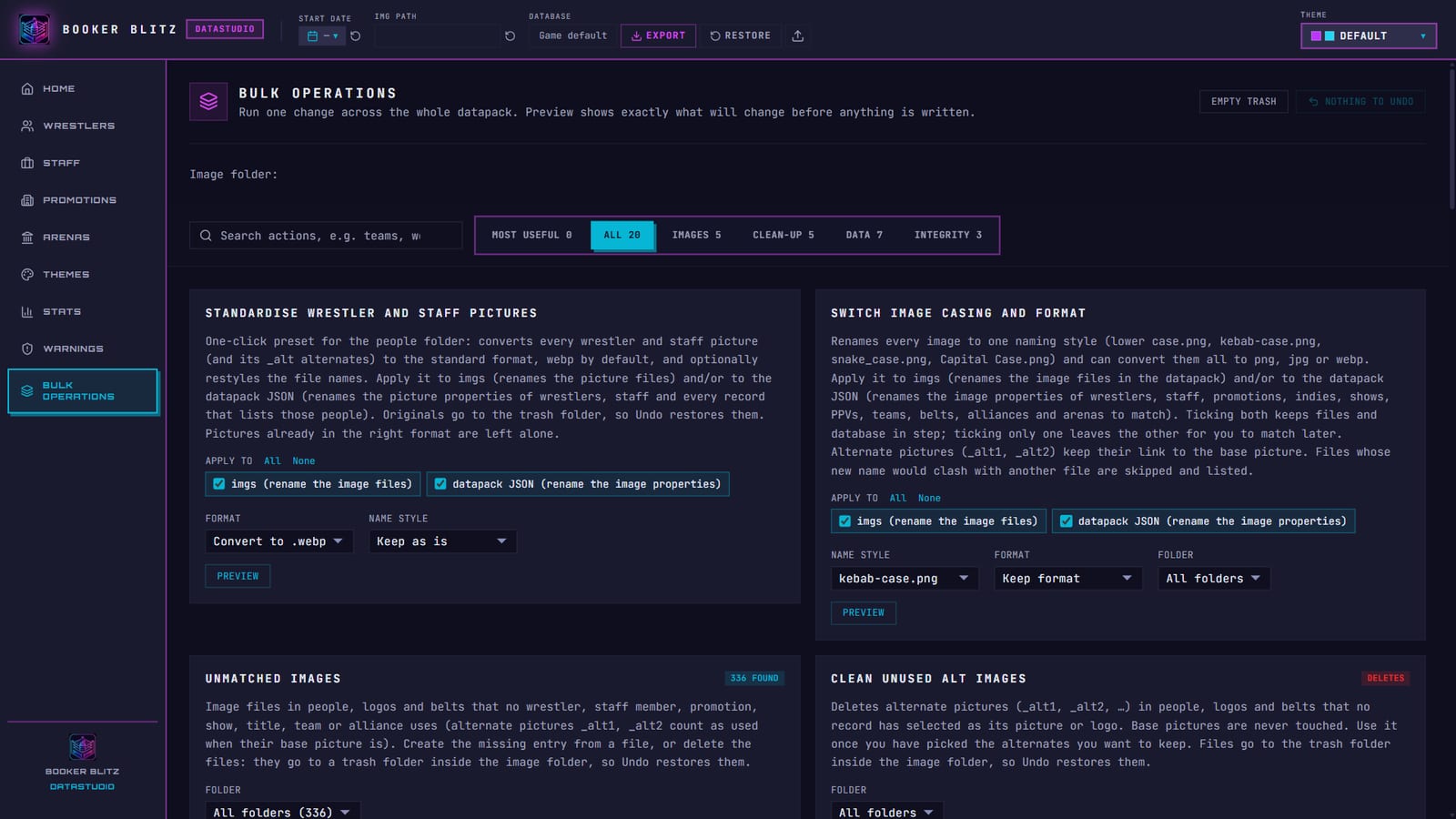
The Most Useful tab only shows operations that have something to fix in the loaded database, so it doubles as a to-do list. If nothing needs attention, it tells you so and points you at the Warnings tab. There is also a search box: type "teams" or "contracts" and the list narrows.
The full list
Images
- Standardise wrestler and staff pictures: one click converts every portrait (and its
_altalternates) to one format, WebP by default, and can restyle file names. Choose whether to rename the files, the database references, or both. - Switch image casing and format: rename every image to
lower case,kebab-case,snake_caseorCapital Case, and convert to PNG, JPG or WebP. Works on people, logos, belts and arenas. - Unmatched images: finds image files nothing uses. Link each one to an existing record, create a new record from it, or delete it.
- Compress and downsize images: re-encodes oversized pictures below a size and quality you set.
- Clean unused alt images: removes alternate pictures nobody selected. Base pictures are never touched.
Clean-up
- Convert low level promotions to indies: moves every promotion at or below a level into the indie circuit. Their contracts end and those workers become free agents, so the preview tells you exactly who.
- Trim database: removes dead and departed people, then obscure free agents below the popularity and ability limits you set.
- Delete stale teams: tag teams and trios without enough active members. Current champions can be kept.
- Delete stale shows: dormant shows, old one-off events and inactive PPVs.
- Delete stale backgrounds: arena images no arena uses.
Data
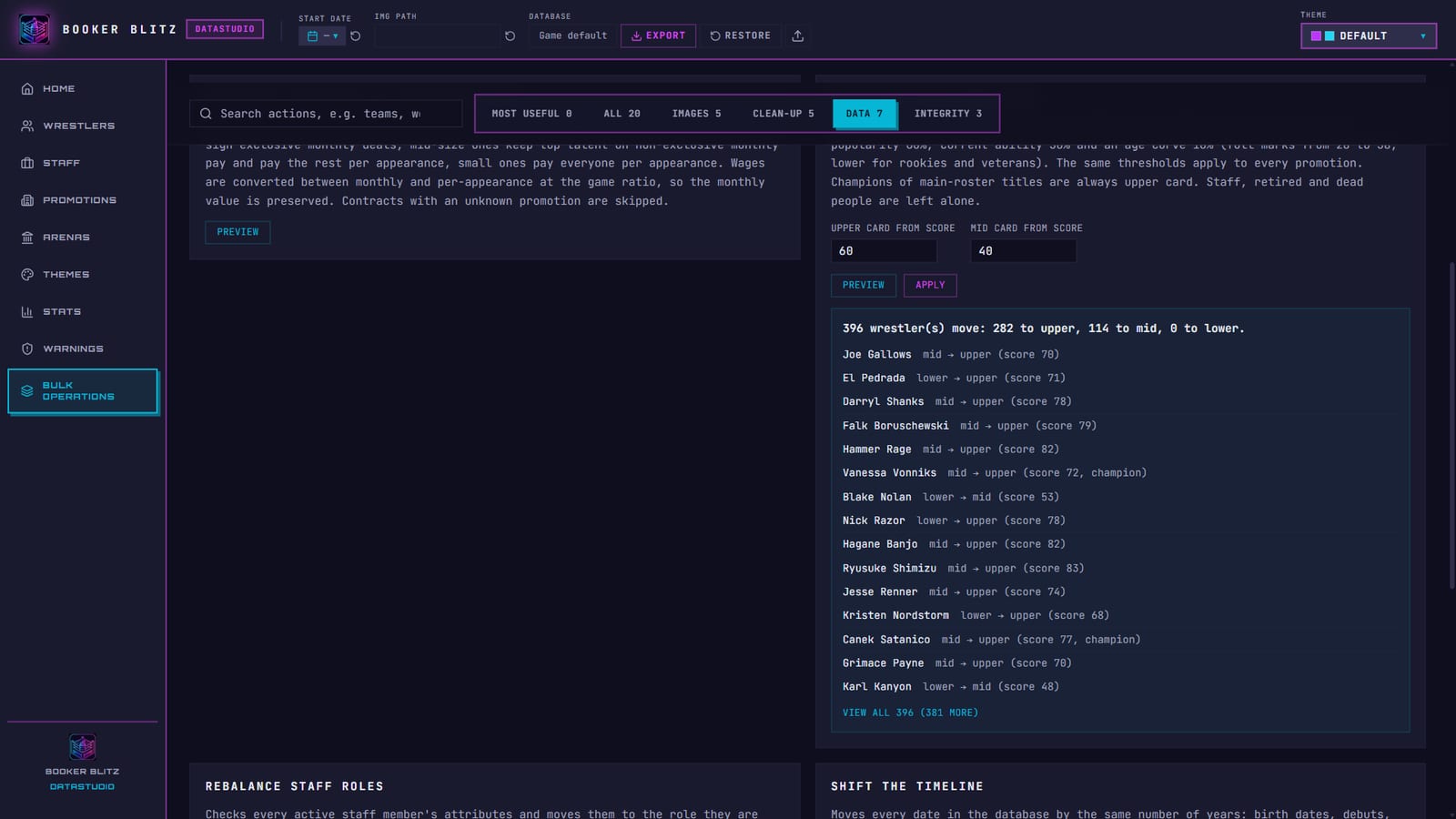
- Rebalance card positions: places every active wrestler on the lower, mid or upper card from one score (popularity 60%, current ability 30%, an age curve 10%). Main-roster champions always stay upper card.
- Rebalance staff roles: moves staff to the role their attributes fit best, but only when the gain beats a margin you choose. Key staff are never moved.
- Rebalance contracts by promotion size: re-terms deals the way AI promotions sign talent. Big promotions sign exclusive monthly contracts, small ones pay per appearance. Monthly value is preserved.
- Recalculate derived stats: fits the four core stats so their median matches each person's current ability. A brawler stays a brawler.
- Regenerate story entries: rewrites biographies from each person's promotion, style, base, debut and age. Can skip hand-written ones.
- Shift the timeline: moves every date in the database by the same number of years. Turn a 2026 database into a 2031 edition and everyone keeps their age.
- Change a field for many people: filter by role, gender, status and promotion, then set one field on all of them (retire, card position, style, base, masked, indie availability and more).
Integrity
- Check and fix broken links: removes references to records that no longer exist (team members, champions, rosters, key-staff slots, alliance members).
- Merge duplicate people: finds workers entered twice, keeps the oldest entry and repoints everything that referenced the duplicates.
- Fill key staff gaps: fills empty owner, GM, booker, writer, referee and commentator slots up to the target for each promotion's level, using staff the promotion already employs first.
Here is Rebalance card positions previewed on the default world: 396 wrestlers would move, with each name, old and new card position, and the score behind it.
Create a custom database from scratch
You have two starting points.
Option A: edit down the default world (recommended). You keep a working structure (shows, titles, staff slots) and replace the content.
- Open Datastudio. When it asks, choose where to save your
.bbdbfile. From now on Ctrl+S updates that file. - Set the Start Date in the top bar. That is the day your universe begins.
- Point IMG PATH at the folder holding your pictures (with
people/,logos/,belts/andarenas/inside). - In Promotions, rename and rebrand the existing promotions, or use Add New Promotion. Set the level (1 to 10), base, audience size and momentum, then fill in shows, PPVs and titles.
- In Wrestlers and Staff, use + New for each person. Pick a type and gimmick, a picture, physical details and stats. In the staff gallery, T changes a role, S regenerates stats for that role and N renames.
- Remove what you do not need. Delete records directly, then run Trim database, Delete stale teams and Delete stale shows to tidy the leftovers.
- Run Check and fix broken links and Fill key staff gaps, then open Warnings until nothing critical is left.
- Run Rebalance card positions and Rebalance contracts by promotion size so the AI books your world sensibly from day one.
- Save with Ctrl+S, or use File → Export Database (.bbdb) for a shareable copy.
Option B: write the JSON yourself. A datapack folder needs wrestlers.json, promotions.json, optionally alliances.json and indies.json, and an images/ folder. Load it with File → Import Datapack Folder and Datastudio checks it for you. The custom datapacks docs cover the format.
Convert a TEW .mdb or .db database
Datastudio converts Total Extreme Wrestling databases straight into Booker Blitz format. It reads:
.mdbMicrosoft Access databases from TEW 2016 and TEW 2020 (and TEW IX).dbSQLite databases.bbdbbundles from Booker Blitz itself
To convert:
- On Home, press Import Database File (or File → Import Database…) and pick the file.
- Datastudio reads the tables and maps workers, alter egos, contracts, promotions, shows, titles and title history, tag teams, stables, storylines and venues into Booker Blitz records.
- Set IMG PATH to your picture folder. Picture references come across with the records, so your existing TEW art lines up.
- Check Home. The metrics and the Database Integrity card tell you right away whether anything came across broken.
Converted databases are rarely tidy. This is where Bulk Operations earns its place. A good clean-up pass after a TEW import:
- Check and fix broken links, then Merge duplicate people.
- Unmatched images to link stray pictures to records, then Standardise wrestler and staff pictures so every portrait has one format and naming style.
- Convert low level promotions to indies to turn tiny feds into the indie circuit.
- Fill key staff gaps, Rebalance staff roles and Rebalance card positions.
- Rebalance contracts by promotion size so contracts follow Booker Blitz's money model.
- Shift the timeline if you want the database to start in a different year.
Booker Blitz is not affiliated with Grey Dog Software. Convert databases you own or have permission to use, and check a mod author's terms before sharing a conversion of their work.
Create a Booker Blitz theme
From scratch
- Open Themes and type a Theme Name.
- Pick Dark or Light. The game switches to this mode when the theme is imported.
- Set Primary, Secondary and Accent. Use the colour swatch or type a hex value.
- Set the five stat colours. Keep them in an obvious order (great to bad), because players read ratings by colour.
- Nudge Hue Rotation if you want portraits tinted to match.
- Pick images for the background slots you want to replace. Wide 16:9 images look best. Leave a slot on Default to keep the bundled art.
- Watch the preview, then press Export Theme.
Want a quick start? Download the starter theme Midnight Puroresu, a dark crimson and gold palette with no custom backgrounds. Import it in the game, or load it in the editor and change it.
From an existing theme
- Built-in presets: use Start From Preset to load any bundled promotion theme, then edit.
- Community themes: open Community Themes, press Import on one you like, rename it and make it yours. Credit the original author if you share it.
A .bbtheme file is plain JSON, so you can also edit it in a text editor:
{
  "format": "bbtheme",
  "version": 1,
  "name": "Midnight Puroresu",
  "colors": {
    "primary": "#e0245e",
    "secondary": "#3b2a5c",
    "accent": "#f5c542",
    "hueRotation": 0,
    "mode": "dark",
    "statGreat": "#22c55e",
    "statBad": "#ef4444"
  }
}
Colours must be six-digit hex values and hueRotation a number from 0 to 360. Backgrounds go in an optional backgrounds object that points at files in the wp/ folder.
Load your database and theme in the game
Database: on the new game screen, press Custom DB and choose Import database file for a .bbdb, or Convert Database (.db / .mdb) to convert inside the game. Set the image folder if asked, pick your promotion and start.
Theme: open Settings → Theme, press Import Theme and choose your .bbtheme. It becomes your Custom promotion theme and its backgrounds appear across the game. Reinstate Pictures puts the bundled backgrounds back.
Finished something good? Share it with the community. Community packs and themes are listed on the resources page.
FAQ: Datastudio, themes and TEW import
Is Datastudio free? Yes. It ships with Booker Blitz at no extra cost.
Can I convert TEW IX, TEW 2020 or TEW 2016 databases?
Yes. Datastudio reads Access .mdb databases and SQLite .db files and converts workers, promotions, titles, teams, contracts and venues.
Will Bulk Operations break my database?
Every operation shows a full preview before it writes anything, and Undo reverts the last one. Image changes go to a trash folder first. Keep a backup .bbdb before big clean-ups anyway.
Do themes change gameplay? No. Themes only change colours and background art.
Can I share my theme or database?
Yes. Export a .bbtheme folder or a .bbdb file and share it. Only include images you have the rights to.
Booker Blitz is a wrestling promotion sim with live match control, out now in Steam Early Access. Read the Datastudio docs for every shortcut.
Written by David, creator of Booker Blitz.